The creator workspace
One workspace. Your next post.
Plan in Flight Deck. Write, rehearse and record. Choose your keeper, finish its cover and caption, then upload on your platform.
Find your next step
See your project pipeline, capture a new idea and return to work already in progress.
Keep the project you are working on in view as you move between the tools.
Open Flight DeckFrom Flight Deck to finished files
Bring one idea. Leave with your files.
Start from your project pipeline. Give the work a place in your week, rehearse the words, compare your takes and prepare a cover and caption for a manual upload.
See the full tour and actual downloads →
Pricing & access · Help with your first post
Included now & release limits
- Email/password accounts
- Flight Deck project pipeline and next-step navigation
- Weekly production planner with project-linked blocks
- Saved projects, scripts and draft recovery
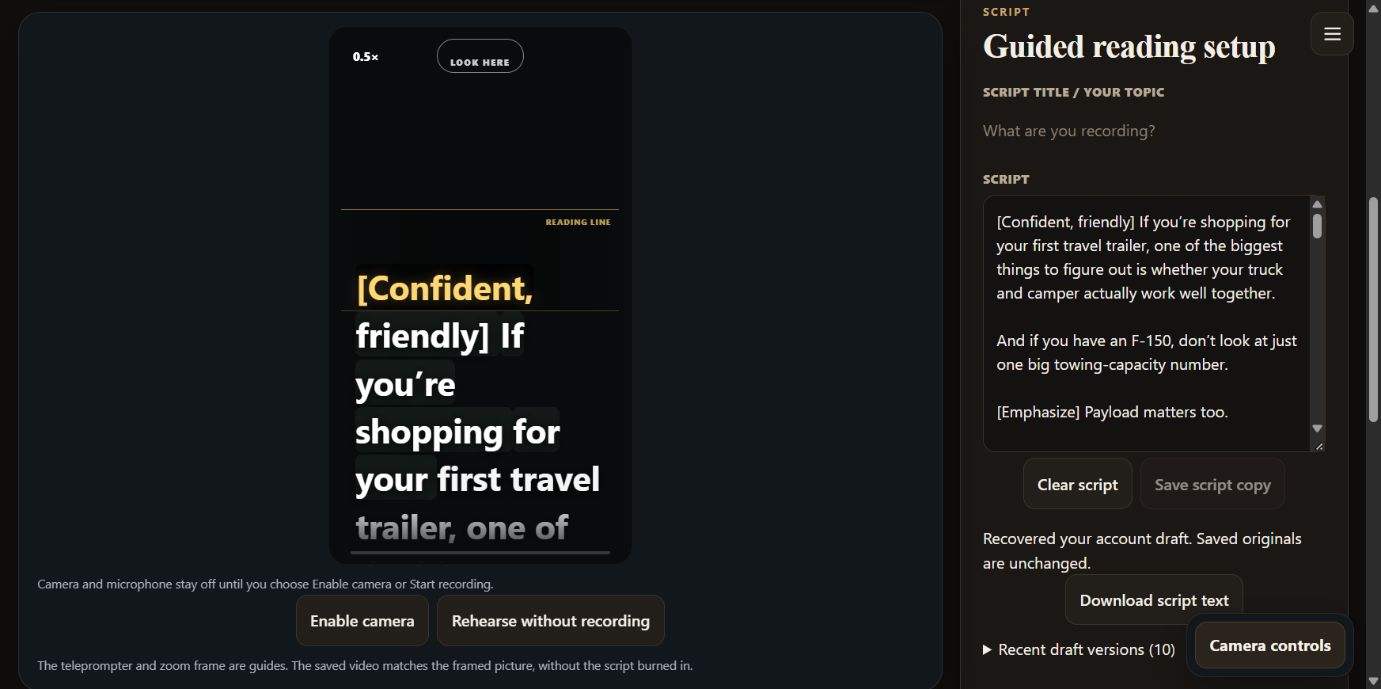
- Camera-free rehearsal and adjustable reading controls
- Named recording sessions and a browser-local gallery
- Comparison of project-linked takes and keeper selection
- Finish Desk: account-saved cover text/settings, local PNG exports, captions and reusable recipe files
- Readiness checks and manual publishing preparation
- Manually entered performance observations
Move to next recording saves video and its script in this browser and device. Find saved takes in Gallery; download important files as a backup because clearing browser storage can remove them. Video format and camera support depend on the browser. Public AI generation, automatic social publishing, cloud video storage and live checkout are not offered in this release.
Built for the next session, too
A place for every part of the post.
Plan the work, keep its context and pick up where you left off. Open the part you need.
Swipe through the tools, or focus the row and use the arrow keys.
Find your next step
See your project pipeline, capture a new idea and return to work already in progress.
Open Flight Deck 02 / Weekly plannerMake room to create
Plan writing, recording and finishing blocks around the time you actually have.
Open Weekly planner 03 / Ideas & scriptsGive one idea a shape
Start with a real question and the facts you want to share. Keep the project and its script together.
Open Ideas & scripts 04 / Recording StudioRehearse. Record. Try again.
Set your reading pace, rehearse camera-free, then record the take you want to keep.
Open Recording Studio 05 / Recording galleryChoose your keeper
Find saved takes, play them back and download the video with its recorded script.
Open Recording gallery 06 / Finish DeskMake the post feel finished
Create a cover, refine the caption and save a reusable design for the next post.
Open Finish Desk 07 / Publishing kitTake it to the right place
Review readiness, copy the caption and open your platform to complete the upload.
Open Publishing kitAccount-backed projects and designs. Device-local video. Manual social uploads. How saving works →
See the earlier script workspace capture
Know where your work lives
Keep the work. Know where to find it.
Use the account for continuity and your device for the footage.
Open the searchable app guide →Projects, scripts and cover designs
Save these in your account and wait for the save confirmation. Return to the same workspace to continue your project, its script and its publishing preparation.
Recording sessions and takes
Move to next recording saves a video-and-script copy in the current browser. Find it in Gallery on that device. Clearing site data, private browsing or storage cleanup can remove local recordings. Download keepers and check picture and sound.
Free website tools
These work without an account. Their inputs stay in the page until you copy or download the result. Opening the app does not automatically carry your text across.
Publishing and statistics
Copy the caption, open the platform, and upload there. A linked profile is a shortcut, not automatic posting or guaranteed live analytics. Add your published link and verified performance observations when ready.
Already creating?